For many years, the smartphone landscape has been dominated by sleek, touchscreen-centric devices that prioritize multimedia consumption and app ecosystems. Yet, for a significant segment of users, particularly those deeply invested in productivity and professional communication, something fundamental has been lost: the tactile satisfaction and undeniable efficiency of a physical keyboard. This sentiment resonates deeply with many who, like myself, transitioned from the BlackBerry era to the modern touchscreen world. While the limitless possibilities of devices like the iPhone were undeniably impressive, the ergonomic mastery of a physical QWERTY keyboard remained an unfulfilled longing.
The truth is, the longer I’ve navigated the digital realm with a purely touchscreen interface, the more apparent its limitations have become for intensive typing tasks. The incessant corrections, the accidental presses, the frustrating battle with autocorrect that often mangles simple words into perplexing gibberish – these are daily struggles that hamper fluid communication. Attempting to compose anything beyond a fleeting message often feels like an exercise in patience, making the prospect of writing longer emails or detailed documents on a virtual keyboard daunting, if not impossible.
It was against this backdrop that the BlackBerry Passport emerged, a device boldly reasserting the relevance of a physical keyboard in an increasingly touch-centric world. Its arrival presented a compelling dilemma: should one fully embrace the glittering bells and whistles of a device like Apple’s iPhone, or return to a sophisticated, work-oriented smartphone that promised the trusted QWERTY keyboard experience so many professionals yearned for? The BlackBerry Passport isn’t just a phone; it’s a statement, a testament to a specific vision of mobile productivity.
The BlackBerry Passport
Redefining Form: The BlackBerry Passport’s Unique Design and Ergonomics
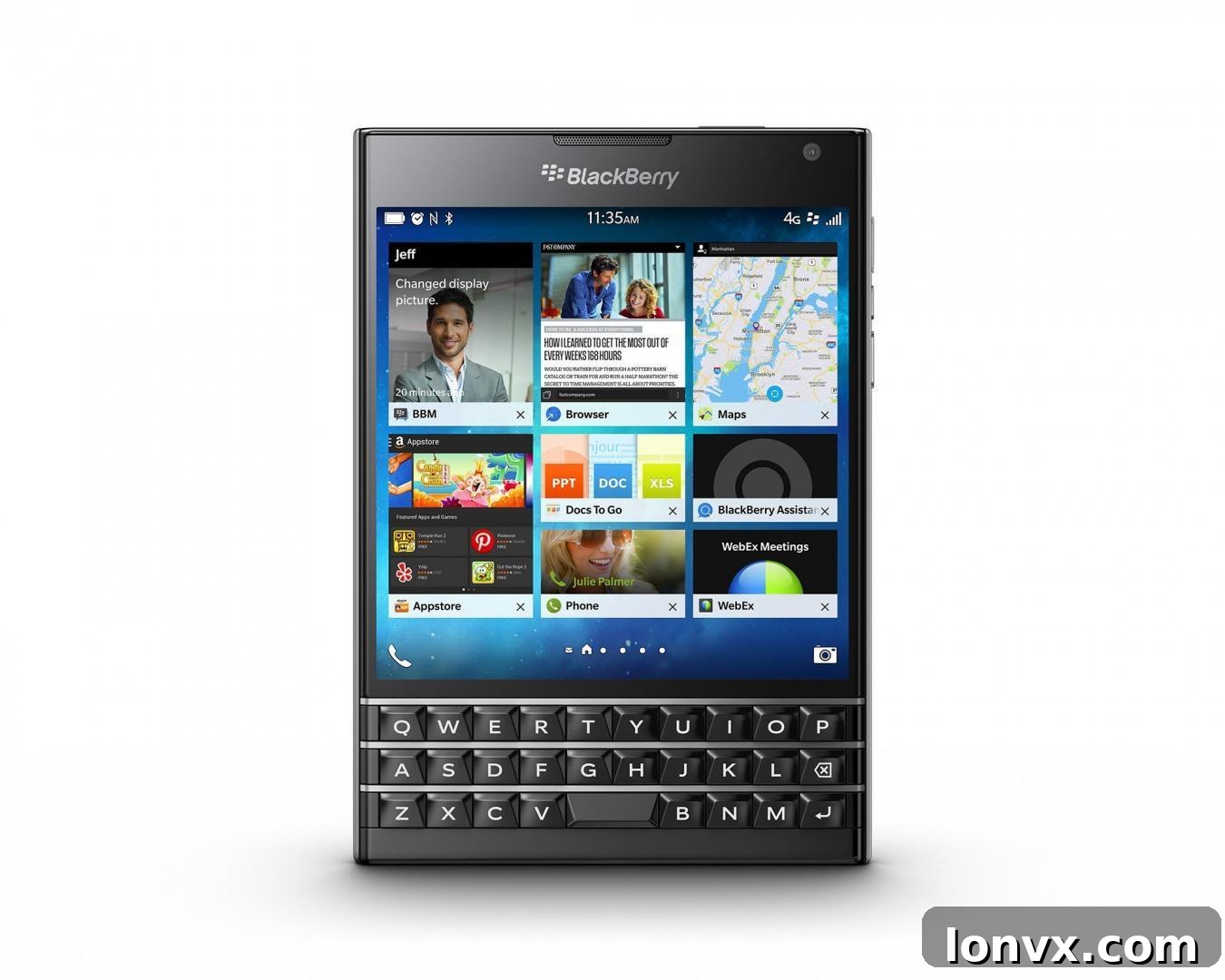
The BlackBerry Passport immediately distinguishes itself through its groundbreaking and unconventional design. As its name cleverly suggests, the device precisely mimics the dimensions of a standard passport, resulting in a wider, more substantial build than most contemporary smartphones. This deliberate design choice isn’t merely aesthetic; it serves a fundamental purpose: to accommodate its signature larger, square screen with a 1:1 aspect ratio. This unique display configuration largely eliminates the constant need to rotate the device between portrait and landscape orientations, providing an expansive and consistent viewing experience for documents, spreadsheets, and web pages.
The wider form factor naturally dictates a two-handed typing approach for the physical keyboard. While this might pose a slight challenge for quick, on-the-go, one-handed messages, it significantly enhances the stability and speed for extended typing sessions. For many users, this trade-off is negligible, as one-handed typing on any smartphone, even touchscreens, often leads to slower input and more errors. Furthermore, the Passport brilliantly integrates robust and highly reliable voice commands, often surpassing the accuracy of its competitors. This feature seamlessly enables hands-free messaging or calling directly from a headset, making communication effortless even when your hands are occupied.
The Passport’s robust build quality exudes a sense of durability and professionalism, perfectly aligning with its target demographic. Its distinctive silhouette stands out in a sea of rectangular slabs, signaling a device crafted for purpose rather than fleeting trends. This design philosophy underscores BlackBerry’s commitment to creating tools that empower professionals, prioritizing functional utility and an optimized workspace over traditional smartphone aesthetics.
The Iconic Keyboard: A Masterclass in Tactile Typing
At the heart of the BlackBerry Passport’s appeal is its meticulously engineered physical keyboard. While it diverges from the traditional four-row QWERTY layout by featuring only three rows of physical keys, this innovation is complemented by a clever touchscreen fourth row that dynamically appears for numbers, symbols, and punctuation marks. This hybrid approach allows for a compact physical keyboard without sacrificing access to essential characters.
Initially, the wide and narrow shape of the keyboard might feel a bit unorthodox, requiring a brief period of adjustment. However, with consistent use, users quickly adapt to its ergonomic advantages. The tactile feedback of genuine physical keys provides an unparalleled typing experience, dramatically reducing errors and increasing typing speed and accuracy compared to any virtual keyboard. The satisfying click and distinct key separation virtually eliminate the ambiguity of touchscreen inputs, transforming typing from a chore into a fluid, almost meditative process.
Beyond its physical attributes, the Passport’s keyboard boasts several ingenious new tricks. While the touchscreen offers all the expected gestures—scrolling, pinch-to-zoom, and multi-touch interactions—the physical keyboard itself now doubles as a highly responsive trackpad. This innovation is a nostalgic nod to the beloved BlackBerry trackpads of old, reimagined for the modern era. Users can effortlessly scroll up and down through messages, web pages, or email threads with a simple, familiar flick of their thumb directly across the touch-sensitive surface of the keyboard. This intuitive gesture control extends to precise cursor manipulation, text selection, and even flicking predicted words into your text, making editing and navigation incredibly efficient and satisfying. This seamless integration of physical and touch input creates a unique, highly productive user interface that sets the Passport apart.
Powering Productivity: BlackBerry 10.3 OS and The Hub
The BlackBerry Passport runs on the robust and highly regarded BlackBerry 10.3 operating system, an OS meticulously designed for efficiency and responsiveness. Unlike many competing mobile platforms that can feel cluttered or overly complex, BB10.3 prides itself on being fast, fluid, and, most importantly, staying out of the user’s way. Its philosophy is centered around facilitating seamless workflow and minimizing distractions, allowing users to focus on their tasks without unnecessary navigational hurdles.
Central to the BlackBerry 10.3 experience is “The Hub.” This innovative feature acts as a unified command center, intelligently consolidating all your critical communications and notifications into one easily accessible location. From emails and text messages to social media updates, calendar appointments, and even calls, The Hub presents a comprehensive, at-a-glance overview of your digital life. This eliminates the need to constantly switch between various applications, significantly streamlining information management and ensuring you never miss an important update. Its intuitive design allows for quick triage and action, making it an indispensable tool for busy professionals.
Navigating the BlackBerry 10.3 OS is remarkably straightforward, characterized by intuitive gestures and a logical menu structure. Most apps are easily discoverable, and the overall user interface is clean and uncluttered. The system’s proactive nature means that it often anticipates your needs, presenting relevant information or actions based on your context. This intelligent design contributes to a highly efficient and satisfying user experience, where productivity is not just a feature, but the core essence of the operating system.
Broadening Horizons: App Ecosystem and BlackBerry Blend
One of the persistent challenges for BlackBerry devices has traditionally been the breadth of their native app ecosystem. Recognizing this, the Passport intelligently addresses the issue by offering compatibility with Android applications via the Amazon Appstore. This pivotal development significantly expands the device’s utility, granting users access to a vast array of popular apps that might not have been natively available on the BlackBerry platform. While the selection through the Amazon Appstore may still be more limited than the Google Play Store, and critically, dedicated Google apps are not directly offered, the ability to run Android applications marks a crucial step in bridging the app gap.
Despite the absence of native Google apps, many essential services can still be integrated effectively. For instance, Google Calendar works seamlessly and integrates perfectly with The Hub, ensuring that your schedule remains synchronized and accessible from your central communication dashboard. This flexibility allows professionals to leverage familiar Android tools while still benefiting from the BlackBerry experience.
Perhaps one of the most powerful and productivity-enhancing exclusive features of the Passport is BlackBerry Blend. This innovative cross-device integration app fundamentally redefines how users interact with their smartphone data across multiple platforms. Blend allows you to seamlessly view and send messages, access documents, manage your calendar, and share content directly from your Passport to your computer or tablet, and vice-versa, without having to physically carry or pick up your phone. It creates a secure, real-time connection, essentially extending your Passport’s capabilities to your other devices. This unparalleled continuity ensures that productivity remains uninterrupted, enabling fluid transitions between your smartphone, laptop, and tablet, regardless of your physical location. For the modern professional who juggles multiple devices throughout their workday, BlackBerry Blend is nothing short of revolutionary.
Robust Performance and Multimedia Capabilities
Underneath its distinctive exterior, the BlackBerry Passport is a powerhouse designed to handle demanding tasks with ease. It is equipped with a formidable quad-core Qualcomm Snapdragon 801 processor, paired with a generous 3GB of RAM. This robust hardware configuration ensures silky-smooth multitasking, rapid application launches, and efficient handling of complex data, solidifying its position as a high-performance business tool. Whether you’re navigating large spreadsheets, managing multiple communication threads, or running resource-intensive applications, the Passport delivers a consistently responsive experience.
Despite its powerful internal components and expansive screen, the Passport boasts truly exceptional battery stamina. Its substantial battery easily lasts an entire day of heavy usage and often extends well beyond, alleviating the common smartphone anxiety of constantly searching for a charging outlet. This incredible endurance is a critical feature for professionals who rely on their device throughout long workdays and travel, ensuring they remain connected and productive without interruption.
While the Passport’s primary focus is undoubtedly productivity, it doesn’t neglect multimedia capabilities. It sports a capable 13-megapixel primary camera, the most powerful ever featured on a BlackBerry device at its release. This camera is adept at capturing high-quality photos and can record stunning 1080p HD video at either 30 or 60 frames per second. While the camera app itself might exhibit occasional sluggishness, the resulting images are generally on par with other leading smartphones in its class. For video conferencing and quick selfies, a basic but functional 2-megapixel front-facing camera is also included. While not intended to rival dedicated professional cameras, the Passport’s camera setup reliably handles everyday photography and video needs with commendable quality.
Who Is the BlackBerry Passport For? Reclaiming the Edge in Productivity
The BlackBerry Passport is, without a doubt, a device with a singular vision and a distinct audience. Its unorthodox shape and form factor, while unique, are direct consequences of its unwavering focus on enhancing productivity. This is not a phone built to compete on every single front with the multimedia powerhouses from Apple or Samsung; instead, it carves out its own niche as a formidable work-oriented smartphone.
While the keyboard itself isn’t universally perfect – some users might, for instance, look forward to the BlackBerry Classic for its even more traditional Curve-like keyboard layout – it still represents a monumental improvement over purely touchscreen alternatives for anyone who types extensively. The tangible feedback, the reduced error rate, and the integrated trackpad functionality fundamentally transform the mobile typing experience. How crucial this feature is ultimately depends on individual usage patterns and the sheer volume of messages, emails, and documents a user generates daily.
Ultimately, the BlackBerry Passport is an excellent fit for the work-oriented real estate professional, the corporate executive, the entrepreneur, or indeed, anyone whose daily tasks demand efficient and accurate text input. It’s a device for those who prioritize seamless communication, robust multitasking, and an enduring battery life over access to every single niche app or cutting-edge camera gimmick. It’s for those who are willing to forgo some of the “bells and whistles” commonly found in other flagship devices in favor of a smartphone that acts as a true productivity partner. And perhaps most importantly, it’s a nostalgic yet forward-thinking choice for anyone who, like me, profoundly misses the sheer joy and efficiency of a physical, tactile keyboard in their pocket.