
The Power of Instagram Reels: A Realtor’s Guide to Dominating Short-Form Video Marketing
The landscape of social media is constantly evolving, and one undeniable truth has emerged: short-form video content reigns supreme. This shift is not merely a trend but a fundamental change in how audiences consume information and engage with brands. Instagram’s CEO, Adam Mosseri, has been unequivocal about the platform’s strategic pivot towards video, a direct response to the immense popularity of competitors like TikTok. This emphasis is so strong that even Facebook now facilitates the seamless sharing of your Instagram Reels to your profile, amplifying your potential reach. For real estate professionals, understanding and leveraging this transition is no longer optional but a critical component of a successful marketing strategy.
While some forward-thinking realtors have effortlessly integrated Instagram Reels into their marketing efforts, many others find themselves at a loss, unsure where to begin with this dynamic content format. The prospect of creating engaging video content can feel overwhelming, especially for those accustomed to traditional static posts. Fortunately, Instagram is continuously refining its platform to simplify content creation, providing intuitive tools designed to help you produce compelling videos and significantly expand your audience reach. By embracing these features, realtors can transform their approach to showcasing properties and connecting with potential clients.
Why Instagram Reels are Indispensable for Real Estate Professionals
For realtors, Instagram Reels offer an unparalleled opportunity to stand out in a crowded market. Unlike static images, video provides an immersive experience, allowing potential buyers to virtually step inside a property and get a true feel for its ambiance, layout, and unique features. This visual storytelling capability is invaluable for building excitement and attracting genuine interest.
Beyond captivating visuals, Reels offer several distinct advantages:
- Wider Reach and Discoverability: Instagram’s algorithm actively promotes Reels, pushing them into the feeds of users who don’t even follow you through the dedicated Reels tab and Explore page. This dramatically increases your chances of reaching a broader, more engaged audience looking for properties or real estate insights.
- Higher Engagement Rates: Short, dynamic videos naturally capture attention more effectively than static images. Users are more likely to watch, like, comment, and share Reels, leading to increased interaction and visibility for your listings.
- Authentic Connection: Reels allow realtors to infuse personality and authenticity into their brand. By appearing on camera, offering quick tips, or providing behind-the-scenes glimpses, you can build trust and rapport with your audience, positioning yourself as a relatable and knowledgeable expert.
- Showcasing Lifestyle: Real estate isn’t just about bricks and mortar; it’s about lifestyle. Reels enable you to portray the lifestyle associated with a property or neighborhood, helping prospective buyers envision themselves living there.
- Competitive Edge: As the platform continues to favor video, realtors who embrace Reels early will gain a significant competitive advantage, positioning themselves as modern, tech-savvy professionals in the real estate industry.
Instagram’s Built-in Tools for Effortless Reel Creation
Recognizing the growing demand for video content, Instagram has introduced several user-friendly features to streamline the Reels creation process. These tools are designed to simplify editing, enhance discoverability, and help you produce professional-looking content without needing advanced video editing skills. Leveraging these features is key to mastering your Realtor Instagram Reels strategy.
Mastering Trending Sounds for Maximum Reach
One of the most powerful features on Instagram Reels is the ability to use trending sounds. These are audio clips – often short music snippets or voiceovers – that are currently popular and frequently used across the platform. Instagram’s algorithm gives a significant boost to Reels that incorporate trending sounds, increasing their likelihood of being seen by a wider audience.
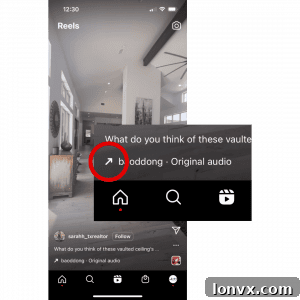
To identify a trending sound, simply keep an eye out for an upward-facing arrow icon that appears next to the audio name at the bottom of a Reel. This small but crucial indicator signifies that the sound is being widely used, watched, and actively engaged with by other users. Incorporating such a sound into your Reel is an excellent and efficient way to quickly garner substantial reach and potentially go viral within your local market. When selecting a trending sound, consider whether its vibe aligns with the property you’re showcasing or the message you’re conveying. A good match can significantly enhance your Reel’s impact and appeal to potential buyers.
Simplifying Content Creation with Reels Templates
For realtors who are new to video editing or simply want to create professional-looking Reels quickly, Instagram’s templates feature is an absolute game-changer. Templates provide pre-designed structures for your videos, complete with timings, transitions, and often trending sounds already integrated.
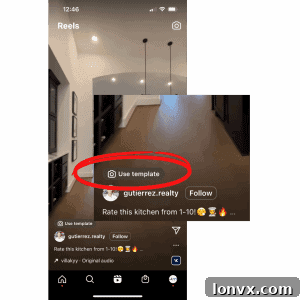
Once you’ve identified a trending sound or found a Reel whose structure you admire, look closely above the original creator’s handle. If you spot a prominent button that says “Use Template,” you’ve struck gold! Tapping this button will automatically load the template into your Reels editor. The process becomes incredibly straightforward: all you’ll need to do is select the pre-recorded videos and/or pictures from your gallery to fill each designated slot within the template. This feature eliminates the guesswork of timing and pacing, allowing you to focus on capturing high-quality footage of your properties, making professional-grade video content accessible to every realtor.
Three Proven Instagram Reel Ideas to Showcase Your Listings Today
To help you get started and overcome any initial hesitation, we’ve curated three effective Instagram Reel ideas. One is a straightforward Reel that doesn’t require a template, and the other two leverage Instagram’s template feature. These concepts are perfect for showcasing your current listings and generating immediate interest.
Idea 1: The Engaging Walk-In and Pan – Capturing Room Ambiance
This Reel idea is wonderfully simple yet highly effective for giving viewers an immediate sense of a room’s size and feel. It’s particularly well-suited for properties with a strong sense of character or inviting spaces. The goal is to create a seamless, immersive experience, as if the viewer is walking into the room themselves. You’ll need a single, continuous video clip where you (holding the camera) walk into a room and smoothly pan from one side to the other, capturing the full scope of the space.
Step-by-Step Guide: Creating Your First “Walk-In and Pan” Reel
- Step 1: View the Example Reel. Tap here to open the inspiration Reel directly on Instagram. Observe the smooth movement and timing.
- Step 2: Access the Trending Audio. At the bottom left of the screen on the example Reel, tap the trending audio name. This will take you to the audio page.
- Step 3: Use or Save Audio. At the bottom of the audio page, tap ‘Use Audio’ to immediately start creating your Reel with this sound. Alternatively, tap ‘Save Audio’ if you wish to store it for later use.
- Step 4: Add Your Video. With the audio selected, tap the blue plus sign on the bottom left of the camera screen to add your pre-recorded “walk-in and pan” video from your gallery. Ensure your video is shot horizontally for the best effect.
- Step 5: Preview and Refine. Tap ‘Preview’ to review your Reel. This is your opportunity to add any text overlays to highlight key features of the room or property. Keep text concise and easy to read.
- Step 6: Select Your Cover Image. Tap ‘Edit Cover.’ You can either upload a custom cover image that represents the listing well or scroll through your video to select an appealing moment as the thumbnail that will appear on your Instagram feed. A good cover image is crucial for attracting clicks.
- Step 7: Craft Your Engaging Caption. Write a compelling caption that tells a story about the home. Let potential buyers envision themselves in the space. Remember, direct links in captions are not clickable on Instagram, so avoid them. Instead, include a clear Call to Action (CTA) inviting viewers to tap the “link in bio” for more information, schedule a showing, or DM you with questions.
- Step 8: Add Location Tags. Don’t forget to add the listing’s location. This helps viewers understand where the property is situated and, more importantly, assists the Instagram algorithm in delivering your Reel to local users who are actively searching in that area.
- Step 9: Share Your Reel. Tap ‘Share’ to publish your Reel and introduce your beautiful listing to the world!
Source : sarahh_txrealtor
Idea 2: Highlighting Open-Concept Spaces with Dynamic Edits
Open-concept layouts are incredibly popular, and this Reel template is perfectly designed to showcase their spaciousness and flow. It allows you to present different areas of an open space – such as the kitchen, dining room, and living room – in a dynamic and engaging sequence. You’ll need three separate, short video clips, each focusing on a distinct area of the open-concept space. For instance, one video for the kitchen, one for the dining area, and one for the living room, ensuring smooth transitions between them.
How to Utilize the Open-Concept Reel Template
- Step 1: Discover the Template. Tap here to view the example Reel on Instagram and experience the template in action.
- Step 2: Activate the Template. Tap the ‘Use Template’ button, usually located above the creator’s username, to load the pre-designed structure into your Reels editor.
- Step 3: Insert Your Videos. You’ll see several grey boxes representing the video slots within the template. Tap each box and select your desired video clips from your camera roll (one for the kitchen, one for the dining, one for the living area). The template will automatically trim and sync them to the chosen audio.
- Step 4: Review and Advance. Tap ‘Next’ twice. For this type of template, we recommend refraining from adding additional text overlays within the video itself. The template’s dynamic cuts are often best appreciated with a clean, unobstructed visual, allowing the space to speak for itself.
- Step 5: Customize Your Cover. As described in the previous example, tap ‘Edit Cover’ to choose an eye-catching cover image for your Reel. This is the first impression on your profile grid.
- Step 6: Write Your Impactful Caption. Develop a compelling caption that describes the benefits of the open-concept layout and invites interaction. Include a clear Call to Action (CTA) that directs viewers back to your profile link (e.g., “See more details about this stunning home – link in bio!”).
- Step 7: Specify the Location. Add the listing’s precise location to help local buyers find your property and improve your Reel’s visibility within geo-targeted searches.
- Step 8: Share Your Masterpiece. Finally, hit ‘Share’ to publish your beautifully crafted Reel and showcase the elegance of your open-concept listing!
Source: gutierrez.realty
Idea 3: Showcasing Multiple Rooms – A Comprehensive Property Overview
This versatile Reel template is perfect for providing a quick yet comprehensive tour of a property, allowing you to highlight various key areas. Whether you want to showcase different angles of a couple of prominent rooms or dedicate each video segment to a distinct room, this template offers flexibility. For this Reel, you’ll need four short video clips, carefully selected to present the best features of the home.
Mastering the Multi-Room Highlight Reel Template
- Step 1: View the Inspiration. Tap here to view the example Reel on Instagram and see how four different video segments can come together effectively.
- Step 2: Select the Template. Locate and tap the ‘Use Template’ button to load this multi-segment structure into your Reels editor.
- Step 3: Populate with Your Videos. Tap on each of the four grey boxes and carefully select your pre-recorded videos. Choose segments that best highlight the unique selling points of each room or area you wish to feature.
- Step 4: Proceed to Next Steps. Tap ‘Next’ twice. Similar to the open-concept template, we generally advise against adding text overlays directly onto this Reel to maintain a clean, polished, and fast-paced visual experience. Let the videos and the template’s editing do the talking.
- Step 5: Update Your Cover Image. Utilize the ‘Edit Cover’ option to select an appealing thumbnail. This image is what followers will see on your main Instagram feed, so ensure it’s visually enticing and represents the property well.
- Step 6: Craft a Detailed Caption and CTA. Write a descriptive caption highlighting the key features shown in the Reel and any other selling points of the property. Conclude with a clear Call to Action, such as “Tour this beautiful home by clicking the link in our bio!” or “DM us for a private showing.”
- Step 7: Add Geo-Location. Always insert the specific location of the property. This is crucial for local SEO on Instagram, helping potential buyers in the vicinity discover your listing.
- Step 8: Publish Your Reel. Hit ‘Share’ to publish your Reel, effectively giving your audience a dynamic tour of the property.
Source : mati_espy_home
Beyond the Templates: General Best Practices for Realtors on Instagram Reels
While templates and trending sounds offer an excellent starting point, mastering Instagram Reels for real estate involves incorporating several broader best practices. These tips will help you maximize your impact, build your brand, and convert viewers into valuable leads.
Crafting Compelling Calls to Action (CTAs)
A beautiful Reel is only truly effective if it prompts viewers to take the next step. Every Reel you post should include a clear, concise Call to Action. Since links in captions aren’t clickable, your CTAs need to be creative and direct viewers to your profile:
- “Tap the link in bio for full property details!”
- “DM us ‘HOME’ for a private tour.”
- “Follow for more dream homes!”
- “Visit our website [link in bio] to explore our latest listings.”
Ensure your link in bio is always updated with the most relevant information, whether it’s a specific property listing, a link to your contact form, or your general website.
The Power of Consistency and Authenticity
To build a loyal audience and maintain algorithmic favor, consistency is key. Aim to post Reels regularly, whether it’s a few times a week or daily. Equally important is authenticity. Don’t be afraid to show your personality, share behind-the-scenes glimpses of your work, or offer quick, valuable real estate tips. People connect with people, not just properties. An authentic approach builds trust and rapport, making you more approachable as a real estate professional.
Essential Tips for Filming and Editing
Even with templates, the quality of your raw footage matters.
- Lighting is Everything: Always film in well-lit conditions, preferably with natural light. Avoid harsh shadows.
- Steady Shots: Use a tripod or stabilize your phone for smooth, professional-looking footage. Shaky videos are distracting.
- Vary Your Angles: Capture rooms from different perspectives to give a comprehensive view.
- Quick Cuts: Reels are short-form content. Keep individual clips brief and to the point.
- Add Value with Text Overlays: While not for every template, consider using text to highlight square footage, amenities, price, or unique selling propositions (e.g., “Expansive Backyard,” “Chef’s Kitchen”).
Engaging with Your Audience
Social media is a two-way street. Respond promptly and thoughtfully to all comments and direct messages on your Reels. Ask questions in your captions to encourage engagement (e.g., “What’s your favorite feature of this home?”). The more you interact, the more Instagram’s algorithm will favor your content, pushing it to a wider audience.
Optimize Your Instagram Profile for Maximum Impact
Once your captivating Reels start attracting new viewers, their next stop will likely be your Instagram profile. Your profile needs to be meticulously optimized to convert these curious visitors into followers and, ultimately, clients. Ensure your bio clearly states you’re a real estate professional, specifies your service area, and highlights your unique selling proposition. Your profile picture should be professional and approachable. Most importantly, your “link in bio” should be strategic and easy to navigate, leading potential clients to your contact information, current listings, or a lead capture form. Don’t let your hard work creating Reels go to waste with an unoptimized profile. If you’re unsure whether your profile is set up to convert, learn more about how to optimize your Instagram profile to encourage more followers and inquiries here.
Give these templates and strategies a try. Embrace the dynamic world of Instagram Reels, and watch as your real estate business transforms through engaging, visually rich content. We’re confident that with practice, you’ll become a Reel-making pro in no time, attracting more eyes to your listings and more clients to your services.
Do you have any questions about creating compelling Instagram Reels for your real estate business, or perhaps some success stories to share? Please leave them in the comments section below! We’d love to hear from you and continue the conversation on effective real estate social media marketing.